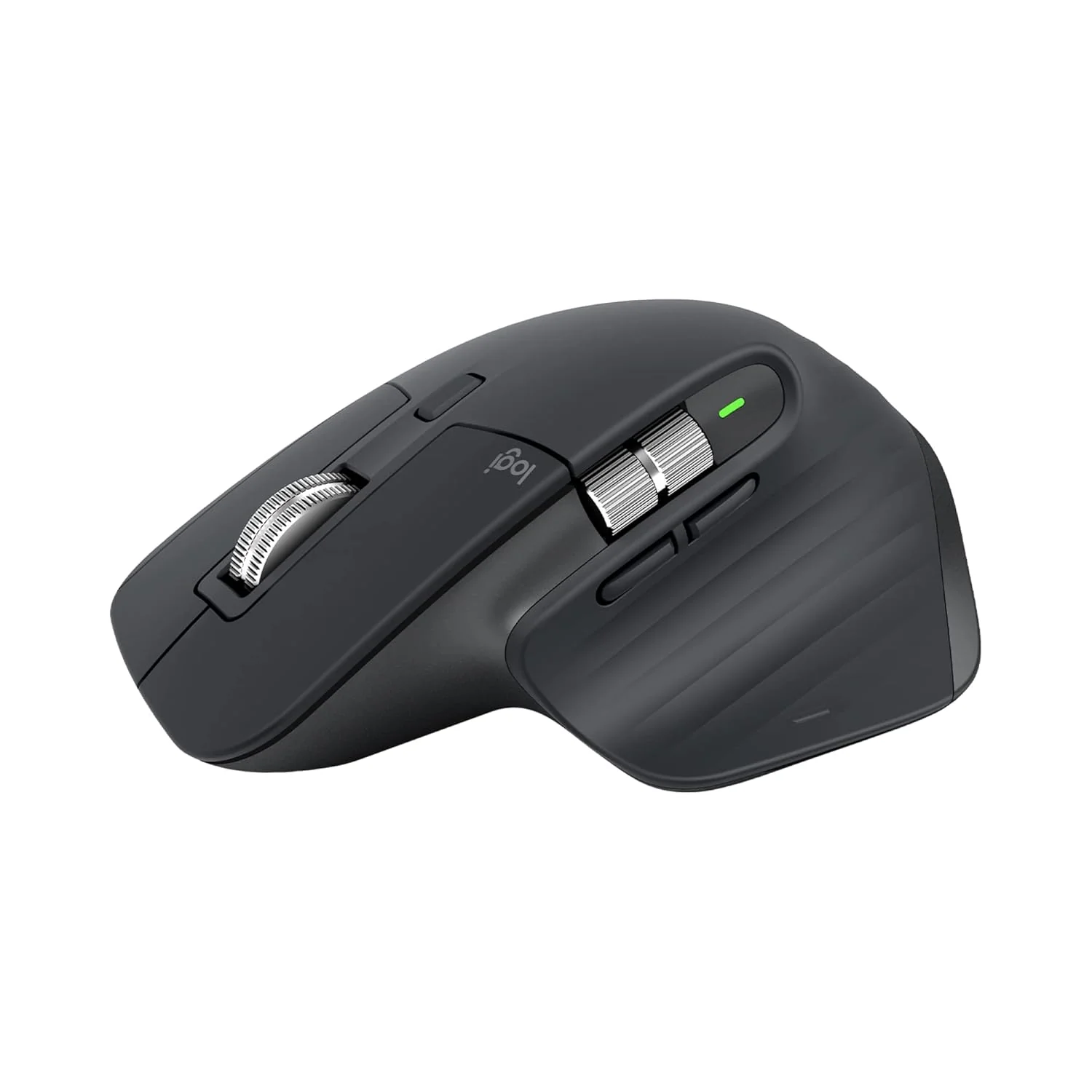
Logitech MX Master 3 Wireless Mouse, Ultrafast Scrolling, Use on Any Surface, Ergonomic, 4000 Dpi, Customisation, USB-C, Bluetooth/USB, Apple Mac iPad OS Microsoft PC Windows Linux, Dark Grey
Features-
- Ultrafast magspeed scrolling - remarkable speed, precision and quietness of electromagnetic scrolling with the magspeed wheel - up to 90 Percent faster and 87 Percent more precise
- Comfort shape and intuitive controls - work comfortably with a ideally sculpted shape and ideally placed thumb wheel and controls. 3 Hours of use from 1 minute charge.Connectivity : Bluetooth & USB Unifying
- App-specific customisation - speed up your workflow by easily customising MX Master 3 to optimise every action for your specific workflow and the apps you use most
- Flow cross-computer control - work seamlessly on three computers, seamlessly transfer cursor, text and files between Windows and MacOS and desktop and laptop
- Works on any surface - even on glass with dark field 4000 DPI sensor, it is faster and 5x more precise than the basic mouse - so you always hit the right pixel, 4 mm minimum glass thickness
- Versatile: Compatible with iPadOS 13.1 or later* via Bluetooth, in addition to Windows 8, Windows 10, 11 or later and MacOS 10.13 or later; *on the iPad, pointing, clicking and scrolling will be supported by enabling the Assistive Touch accessibility feature

Key Features

WHEEL FOCUS BANNER
ULTRAFAST MAG SPEED ELECTROMAGNETIC SCROLLING
Experience the remarkable speed, precision, and silence of magnetic scrolling with the all new Mag Speed Wheel. It’s up to 90% faster (1), 87% more precise (2), and ultra quiet.
(1) Compared to regular Logitech mouse without an electromagnetic scroll wheel
(2) Compared to Logitech MX Master 2S mouse with Logitech Options installed and Smooth Scrolling enabled

COMFORT SHAPE WITH INTUITIVE THUMB CONTROLS
Work comfortably with a silhouette perfectly crafted for the shape of your palm. Create, make, and do more intuitively with ideally-placed front/back, and gesture buttons – and an all new thumb wheel built of machined steel.

MAKE YOUR OWN CUSTOMIZATIONS
Customize MX Master 3 in Logitech Options and optimize every action for your specific workflow. You’ll get one-tap access to everything you need in the apps you use most (1).
(1) Requires Logitech Options software, available for download at www.logitech.com/options
Key Features

WORK FASTER WITH APP-SPECIFIC PROFILES
Speed up your workflow with predefined app-specific profiles (1) in Adobe Photoshop, Adobe Premiere Pro, Final Cut Pro, Google Chrome, Safari, and Microsoft Word, Excel, PowerPoint, and Edge
(1) Requires Logitech Options software, available for download at www.logitech.com/options

FLOW CROSS-COMPUTER CONTROL
Seamlessly control multiple computers across Windows and macOS operating systems with your Flow-enabled MX Master 3. Effortlessly transfer text, images, and files between computers – just copy on one and paste to the other (1).
(1) Requires Logitech Options software, available for download at www.logitech.com/options

TRACK PRECISELY ON ANY SURFACE
MX Master 3 is faster and 5x more precise than the basic mouse (1) – so you hit the right pixel every time. Logitech Darkfield Tracking allows you to track on virtually any surface – even glass (2) – with best in class 4000 DPI precision.
(1) Compared to regular Logitech mouse
(2) 4 mm minimum glass thickness
Key Features

USB-C RECHARGEABLE
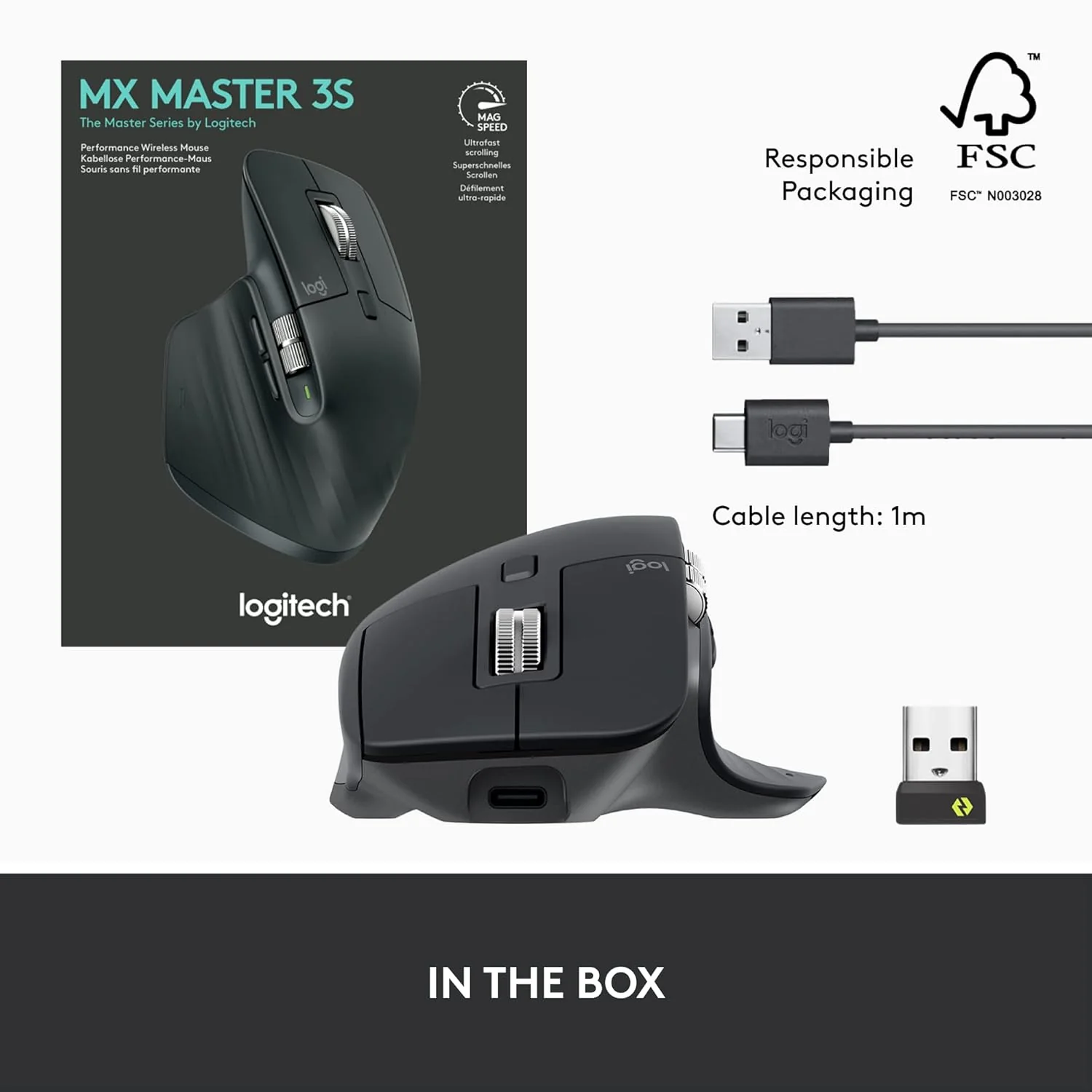
MX Master 3 stays powered for up to 70 days on a full charge – and gets three hours of use from a one-minute quick charge (1). Use the included USB-C charging cable to top up the power.
(1) Battery life may vary based on user and computing conditions.

MULTI-DEVICE AND MULTI-OS
Connect to up to three devices via Bluetooth Low Energy or the included USB receiver– and switch between them at the tap of a button. MX Master 3 works with Windows, macOS & Linux(1) operating systems.
(1)Sensor, wheel, and buttons will be supported without adding additional drivers in most popular Linux distributions

MX MASTER 3 & MX KEYS
MX Master 3 has been designed, developed, and engineered with its companion keyboard, MX Keys. Get a premium look and feel, seamless workflow, and advanced functionality when you team MX Master 3 with MX Keys. You can charge both MX products with a single USB-C charging cable
Product Information
Product Information
Shipping & Returns
Shipping & Returns


Logitech MX Master 3 Wireless Mouse, Ultrafast Scrolling, Use on Any Surface, Ergonomic, 4000 Dpi, Customisation, USB-C, Bluetooth/USB, Apple Mac iPad OS Microsoft PC Windows Linux, Dark Grey
Logitech MX Master 3 Wireless Mouse, Ultrafast Scrolling, Use on Any Surface, Ergonomic, 4000 Dpi, Customisation, USB-C, Bluetooth/USB, Apple Mac iPad OS Microsoft PC Windows Linux, Dark Grey
Features-
- Ultrafast magspeed scrolling - remarkable speed, precision and quietness of electromagnetic scrolling with the magspeed wheel - up to 90 Percent faster and 87 Percent more precise
- Comfort shape and intuitive controls - work comfortably with a ideally sculpted shape and ideally placed thumb wheel and controls. 3 Hours of use from 1 minute charge.Connectivity : Bluetooth & USB Unifying
- App-specific customisation - speed up your workflow by easily customising MX Master 3 to optimise every action for your specific workflow and the apps you use most
- Flow cross-computer control - work seamlessly on three computers, seamlessly transfer cursor, text and files between Windows and MacOS and desktop and laptop
- Works on any surface - even on glass with dark field 4000 DPI sensor, it is faster and 5x more precise than the basic mouse - so you always hit the right pixel, 4 mm minimum glass thickness
- Versatile: Compatible with iPadOS 13.1 or later* via Bluetooth, in addition to Windows 8, Windows 10, 11 or later and MacOS 10.13 or later; *on the iPad, pointing, clicking and scrolling will be supported by enabling the Assistive Touch accessibility feature
Key Features
WHEEL FOCUS BANNER
ULTRAFAST MAG SPEED ELECTROMAGNETIC SCROLLING
Experience the remarkable speed, precision, and silence of magnetic scrolling with the all new Mag Speed Wheel. It’s up to 90% faster (1), 87% more precise (2), and ultra quiet.
(1) Compared to regular Logitech mouse without an electromagnetic scroll wheel
(2) Compared to Logitech MX Master 2S mouse with Logitech Options installed and Smooth Scrolling enabled
COMFORT SHAPE WITH INTUITIVE THUMB CONTROLS
Work comfortably with a silhouette perfectly crafted for the shape of your palm. Create, make, and do more intuitively with ideally-placed front/back, and gesture buttons – and an all new thumb wheel built of machined steel.
MAKE YOUR OWN CUSTOMIZATIONS
Customize MX Master 3 in Logitech Options and optimize every action for your specific workflow. You’ll get one-tap access to everything you need in the apps you use most (1).
(1) Requires Logitech Options software, available for download at www.logitech.com/options
Key Features
WORK FASTER WITH APP-SPECIFIC PROFILES
Speed up your workflow with predefined app-specific profiles (1) in Adobe Photoshop, Adobe Premiere Pro, Final Cut Pro, Google Chrome, Safari, and Microsoft Word, Excel, PowerPoint, and Edge
(1) Requires Logitech Options software, available for download at www.logitech.com/options
FLOW CROSS-COMPUTER CONTROL
Seamlessly control multiple computers across Windows and macOS operating systems with your Flow-enabled MX Master 3. Effortlessly transfer text, images, and files between computers – just copy on one and paste to the other (1).
(1) Requires Logitech Options software, available for download at www.logitech.com/options
TRACK PRECISELY ON ANY SURFACE
MX Master 3 is faster and 5x more precise than the basic mouse (1) – so you hit the right pixel every time. Logitech Darkfield Tracking allows you to track on virtually any surface – even glass (2) – with best in class 4000 DPI precision.
(1) Compared to regular Logitech mouse
(2) 4 mm minimum glass thickness
Key Features
USB-C RECHARGEABLE
MX Master 3 stays powered for up to 70 days on a full charge – and gets three hours of use from a one-minute quick charge (1). Use the included USB-C charging cable to top up the power.
(1) Battery life may vary based on user and computing conditions.
MULTI-DEVICE AND MULTI-OS
Connect to up to three devices via Bluetooth Low Energy or the included USB receiver– and switch between them at the tap of a button. MX Master 3 works with Windows, macOS & Linux(1) operating systems.
(1)Sensor, wheel, and buttons will be supported without adding additional drivers in most popular Linux distributions
MX MASTER 3 & MX KEYS
MX Master 3 has been designed, developed, and engineered with its companion keyboard, MX Keys. Get a premium look and feel, seamless workflow, and advanced functionality when you team MX Master 3 with MX Keys. You can charge both MX products with a single USB-C charging cable
Product Information
Product Information
Shipping & Returns
Shipping & Returns
Description
Features-
- Ultrafast magspeed scrolling - remarkable speed, precision and quietness of electromagnetic scrolling with the magspeed wheel - up to 90 Percent faster and 87 Percent more precise
- Comfort shape and intuitive controls - work comfortably with a ideally sculpted shape and ideally placed thumb wheel and controls. 3 Hours of use from 1 minute charge.Connectivity : Bluetooth & USB Unifying
- App-specific customisation - speed up your workflow by easily customising MX Master 3 to optimise every action for your specific workflow and the apps you use most
- Flow cross-computer control - work seamlessly on three computers, seamlessly transfer cursor, text and files between Windows and MacOS and desktop and laptop
- Works on any surface - even on glass with dark field 4000 DPI sensor, it is faster and 5x more precise than the basic mouse - so you always hit the right pixel, 4 mm minimum glass thickness
- Versatile: Compatible with iPadOS 13.1 or later* via Bluetooth, in addition to Windows 8, Windows 10, 11 or later and MacOS 10.13 or later; *on the iPad, pointing, clicking and scrolling will be supported by enabling the Assistive Touch accessibility feature
Key Features
WHEEL FOCUS BANNER
ULTRAFAST MAG SPEED ELECTROMAGNETIC SCROLLING
Experience the remarkable speed, precision, and silence of magnetic scrolling with the all new Mag Speed Wheel. It’s up to 90% faster (1), 87% more precise (2), and ultra quiet.
(1) Compared to regular Logitech mouse without an electromagnetic scroll wheel
(2) Compared to Logitech MX Master 2S mouse with Logitech Options installed and Smooth Scrolling enabled
COMFORT SHAPE WITH INTUITIVE THUMB CONTROLS
Work comfortably with a silhouette perfectly crafted for the shape of your palm. Create, make, and do more intuitively with ideally-placed front/back, and gesture buttons – and an all new thumb wheel built of machined steel.
MAKE YOUR OWN CUSTOMIZATIONS
Customize MX Master 3 in Logitech Options and optimize every action for your specific workflow. You’ll get one-tap access to everything you need in the apps you use most (1).
(1) Requires Logitech Options software, available for download at www.logitech.com/options
Key Features
WORK FASTER WITH APP-SPECIFIC PROFILES
Speed up your workflow with predefined app-specific profiles (1) in Adobe Photoshop, Adobe Premiere Pro, Final Cut Pro, Google Chrome, Safari, and Microsoft Word, Excel, PowerPoint, and Edge
(1) Requires Logitech Options software, available for download at www.logitech.com/options
FLOW CROSS-COMPUTER CONTROL
Seamlessly control multiple computers across Windows and macOS operating systems with your Flow-enabled MX Master 3. Effortlessly transfer text, images, and files between computers – just copy on one and paste to the other (1).
(1) Requires Logitech Options software, available for download at www.logitech.com/options
TRACK PRECISELY ON ANY SURFACE
MX Master 3 is faster and 5x more precise than the basic mouse (1) – so you hit the right pixel every time. Logitech Darkfield Tracking allows you to track on virtually any surface – even glass (2) – with best in class 4000 DPI precision.
(1) Compared to regular Logitech mouse
(2) 4 mm minimum glass thickness
Key Features
USB-C RECHARGEABLE
MX Master 3 stays powered for up to 70 days on a full charge – and gets three hours of use from a one-minute quick charge (1). Use the included USB-C charging cable to top up the power.
(1) Battery life may vary based on user and computing conditions.
MULTI-DEVICE AND MULTI-OS
Connect to up to three devices via Bluetooth Low Energy or the included USB receiver– and switch between them at the tap of a button. MX Master 3 works with Windows, macOS & Linux(1) operating systems.
(1)Sensor, wheel, and buttons will be supported without adding additional drivers in most popular Linux distributions
MX MASTER 3 & MX KEYS
MX Master 3 has been designed, developed, and engineered with its companion keyboard, MX Keys. Get a premium look and feel, seamless workflow, and advanced functionality when you team MX Master 3 with MX Keys. You can charge both MX products with a single USB-C charging cable